Use the app
Read your billing snapshot
Understand the room calculations and prompts that change as you edit a day.
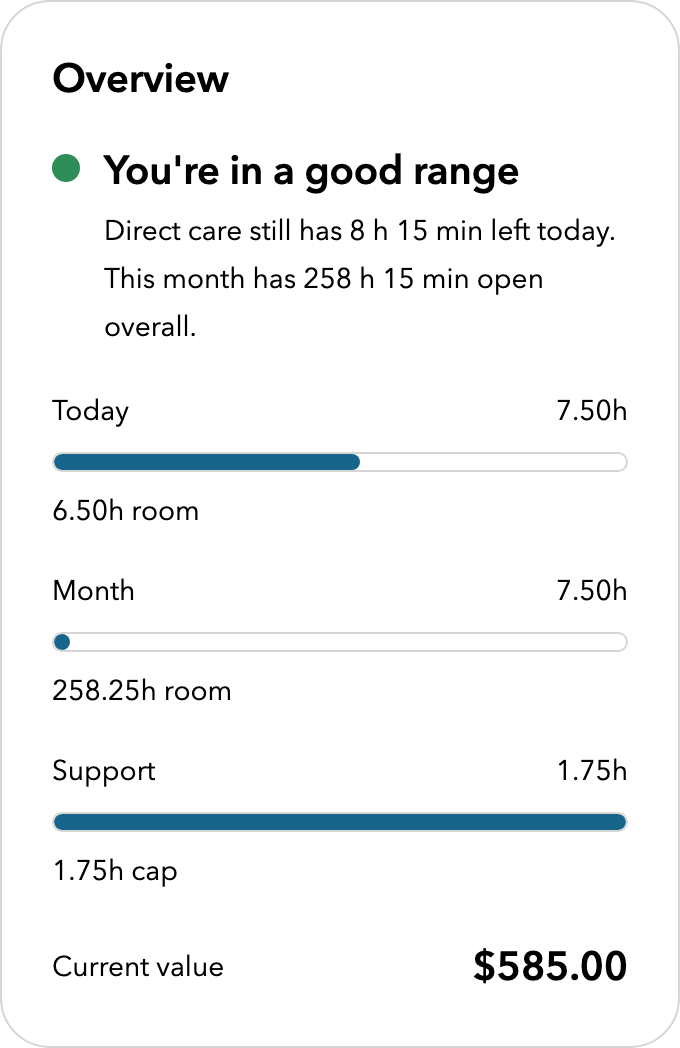
Quick answer: The billing snapshot applies the app's current rules to the records available to it. It shows the time and base value recorded for the day and month, the remaining room, and the support-time room. It is a review aid, not a claim decision.
Last reviewed October 9, 2026
What the numbers mean
| Number | What it tells you |
|---|---|
| Today | The time recorded for the selected day across the four categories. |
| Month | The time recorded in the selected billing month, compared with the prorated monthly maximum. |
| Support | Indirect care plus clinical administration, compared with the available support pool. |
| Current value | The estimated base value of the normalized time. It is not a payment forecast. |
Why the snapshot changes
- Direct care and out-of-office telephone care form the base used to calculate support-time room.
- Adding indirect care uses the support pool and can reduce the room available for clinical administration.
- Saved entries elsewhere in the month affect monthly room and monthly ratios.
- Changing a category can change several numbers at once. That is expected because the limits are related.
What a prompt means
| Prompt | What to check |
|---|---|
| Daily limit | The four categories together may be over the 56-unit daily maximum. |
| Monthly limit | The saved month may be over its prorated maximum. |
| Support pool | Indirect care plus clinical administration may be over 25% of monthly hourly time. |
| Clinical administration | Clinical administration may be over its separate 5% ratio. |
| Missing entry | The calendar has a day with no saved entry or explicit zero record. It does not prove that work was missed. |
Respond to a warning
- Open the day or month named by the prompt.
- Compare the entry with your source records. Check the date, category, units, and activity description.
- Correct the record when it is wrong. Do not remove truthful time just to make a prompt disappear.
- If the entry is correct but the result is still unclear, compare the totals with the current Ministry or OMA guidance before billing.
What the snapshot cannot know
- It cannot see hours or claims kept only in your EMR, billing software, or another FHO+ account.
- It cannot decide whether a specific service, patient, location, or task meets the FHO+ agreement.
- Its estimate does not include shadow billing, premiums, special payments, relativity adjustments, or payment corrections.
Important notes
- The app's room calculation is a ceiling. It does not create billable time that you did not work.