Use the app
Log a day
Enter the time you worked for one service date and keep the four categories separate.
Quick answer: On Today, record cumulative time for the selected service date. Use the direct-care fields for patient contact, Q312A for patient-specific work without contact, and Q313A for eligible non-patient-specific clinical administration.
Last reviewed October 9, 2026
Check the service date
- Today opens on the current date. Confirm the date before entering anything, especially when you are catching up on several days.
- Use Calendar to open an earlier date. Do not move time to the day you happen to enter it. The claim date must match the day the work occurred.
Enter direct care
Choose the field from the type and setting of the patient contact. Today labels the standard direct-care field In-office; that field also covers synchronous video care from outside the usual setting. Only telephone care from outside the usual practice setting belongs in the Out-of-office field.
- Confirm the service date, then enter the cumulative minutes for each field. The app accepts the day's total; you do not need to time every patient separately.
- Use a direct-care preset if it matches the work. Selecting one fills its saved duration into its saved location field; adjust the total when the day differed.
| Work example | Today field | Code to review |
|---|---|---|
| In-person visit at the usual clinic | In-office | Q310A |
| Synchronous phone or video visit from the usual clinic | In-office | Q310A |
| Synchronous telephone visit from home or another location away from the usual clinic | Out-of-office | Q311A |
| Synchronous video visit while away from the usual clinic | In-office (standard direct-care) field | Q310A |
Enter support time
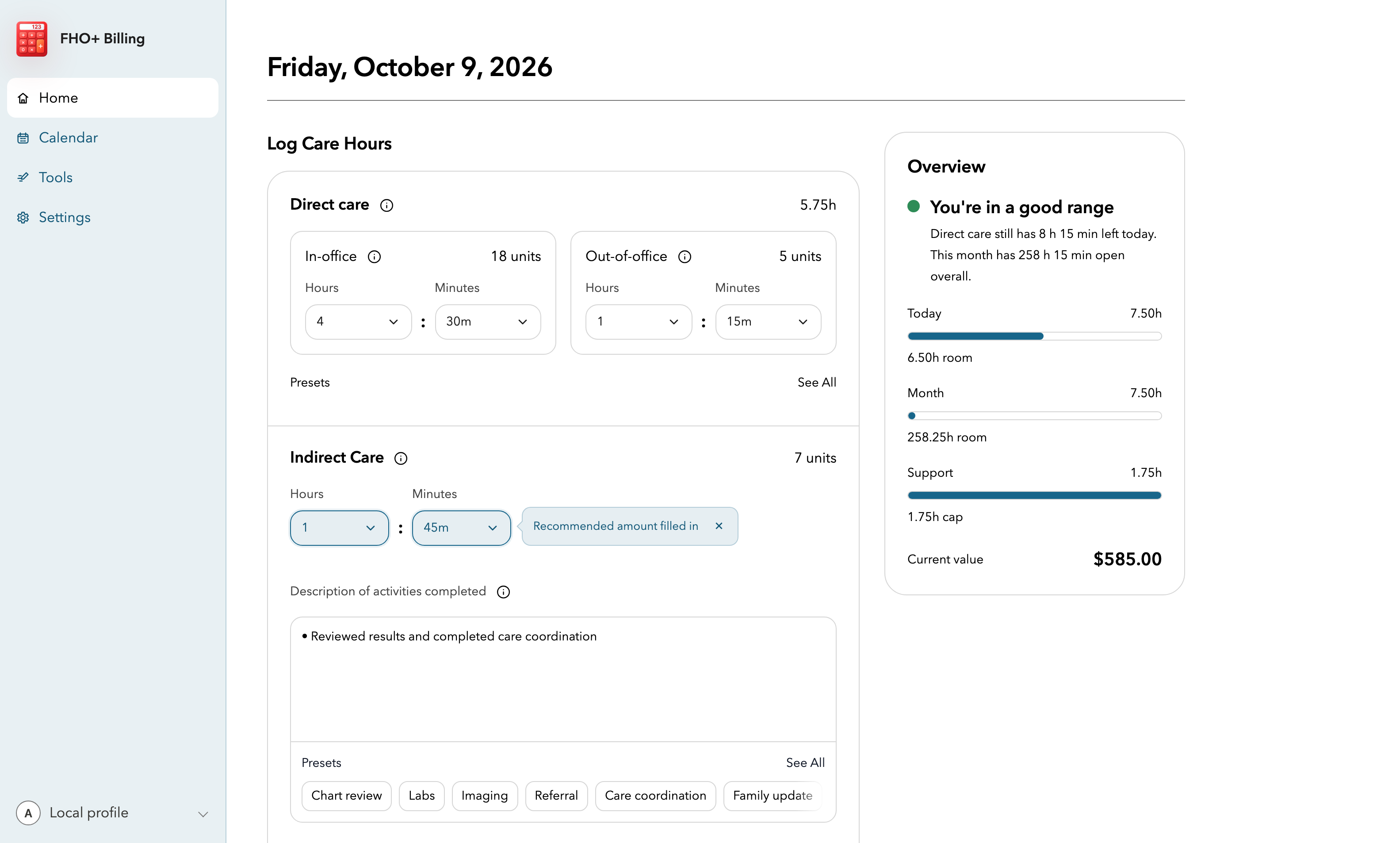
In the sample screen, 5 h 45 min of direct care is entered and FHO+ Billing has filled 1 h 45 min as the recommended indirect amount. Keep that number only if it matches eligible indirect work you actually did. The description shown is an example of the short daily activity summary the OMA guidance describes.
- Use indirect care for work tied to a specific patient, such as charting, reviewing results, referrals, or care coordination.
- The app may fill a recommended indirect-care amount when optimized mode is on. Compare it with the eligible indirect work you actually completed; edit it if needed. The suggestion is not a record of work or a decision that the time is eligible.
- Add a brief activity summary in Description of activities completed. The app requires this description when indirect time is entered. You can type a concise summary or select an indirect-care tag to insert reusable text, then edit it to match the day.
- Use clinical administration only for eligible non-patient-specific work that concerns the roster or FHO practice and requires physician expertise. Open Administrative Hours to enter it and add its separate description.
- Check that the time is your own work for eligible rostered patients or the FHO practice. Staff or delegate time does not become billable physician time.
Save and correct the record
- Save hours marks the day as complete and includes it in month totals and reports. An unsaved first draft is not included.
- After a day has been saved once, later edits can auto-save. Wait for the saved message before leaving the page.
- Reopen a saved day from Calendar when you need to correct it. Save again after checking the totals and descriptions.
- A day with no eligible FHO+ work does not need a record. You can mark it as zero in Calendar when that helps separate a confirmed zero from a day you have not reviewed.
Important notes
- FHO+ Billing stores daily totals and activity descriptions. It is not a patient chart and does not replace your EMR.
- Avoid patient names, health card numbers, and clinical details when a generic activity description is enough.